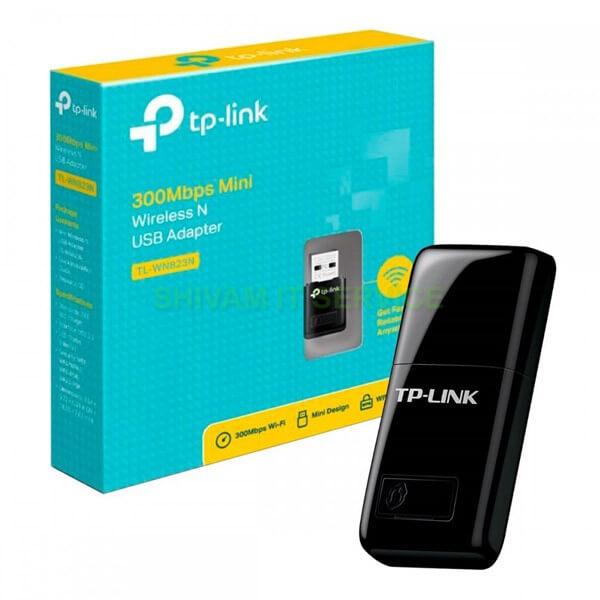
TP-Link TL-WN823N USB Wifi is a high-speed N standard wireless adapter that easily and quickly connects your laptop or desktop to a Wifi network.
Specifications:
- Wifi Standard: IEEE 802.11b/g/n
- Wifi Speed: Up to 300Mbps
- Frequency Band: 2.4GHz
- Antenna Type: 1 Internal Antenna
- Interface: USB 2.0
- Operating System: Windows, macOS, Linux
- Dimensions: 39 x 18.35 x 7.87 mm
- Weight: 9.1 g
Key Features:
- High Speed N Wifi: Supports IEEE 802.11b/g/n with transmission speeds up to 300Mbps for fast internet access, smooth HD streaming, and lag-free online gaming.
- Compact and Convenient Design: Small size, easy to carry while traveling.
- Easy Installation and Use: Simple setup, just plug into a computer USB port and use.
- Multi-OS Support: Compatible with Windows, macOS, Linux.
- WPS Support: Secure wireless connection with one button press.
- SoftAP Support: Turn your computer into a Wi-Fi hotspot to share internet with other devices.
How to Use Efficiently:
1. Software Installation:
- Download software from TP-Link website.
- Extract and run the installer file.
- Follow on-screen instructions.
2. Connecting to Wifi:
- Plug the TL-WN823N into a USB port.
- Open the TP-Link management software.
- Select the Wifi network and enter the password.
- Click "Connect".
3. Connection Optimization:
- Place in an area with strong signal; avoid metal, concrete, or other electronics that cause interference.
- Use power-saving mode when idle.
- Regularly update software for best performance and security.
- Restart the device periodically to resolve connection issues.
4. Useful Tips:
- Use Micro SD card for data storage if applicable.
- Turn off unnecessary features like Bluetooth, GPS.
- Use SoftAP mode to share internet.
- Connect up to 10 devices simultaneously.
Notes:
- Use in strong signal areas for best performance.
- Update software regularly.
- Avoid water and extreme temperatures.