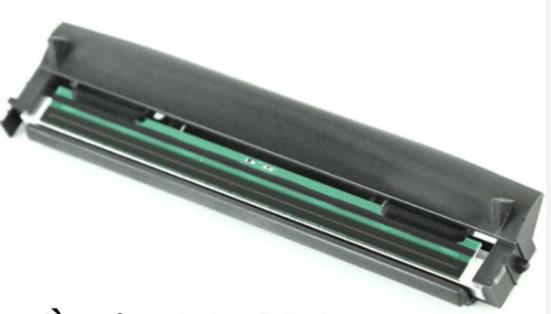
Printhead for Zebra P1080383-227 Barcode Printer is a critical component in barcode printers, responsible for creating images and barcodes on labels using thermal print technology. This is a specialized printhead designed specifically for Zebra's mid-range industrial barcode printers, renowned for its sharpness and durable operation.
Key Highlights
- High Resolution (300dpi): With a density of 300 dots per inch, this printhead delivers extremely sharp print quality. It allows precise printing of ultra-small 2D barcodes (QR Code, Data Matrix) or small fonts on electronic component labels without smudging.
- Element Energy Equalizer (E3™) Technology: This is Zebra's proprietary technology that evenly distributes heat to each print element, extending printhead life and ensuring consistent print quality across every meter of labels.
- Perfect Compatibility: As a genuine Zebra product, part number P1080383-227 ensures absolute mechanical and electronic compatibility, allowing the printer to operate stably immediately after replacement without complex calibration.
- Versatile with Various Ribbon Types: The printhead is coated with a premium protective layer, allowing it to work well with various ribbon types, from common Wax ribbons to premium Wax/Resin or Resin ribbons requiring high melting temperatures.
When to Replace the Printhead?
- White Lines Appear: The printout has one or more vertical white lines along the label (due to burned-out thermal resistor elements).
- Locally Faded Prints: Uneven heat distribution causes parts of the barcode to fade, making it unreadable by scanners.
- Surface Scratches: Dust or foreign objects scratch the quartz protective layer on the printhead surface.
Important Tips to Extend Lifespan
- Regular Cleaning: This is the "golden" rule. Use a specialized printhead cleaning pen or a cotton swab dipped in 90° alcohol to wipe away carbon dust and adhesive residue after replacing each ribbon roll.
- Pressure and Temperature: Avoid setting the print temperature (Darkness) too high unless necessary. Printhead pressure should also be adjusted just enough for smooth label movement, avoiding excessive pressure that wears down the surface.
- Quality of Consumables: Use standard, clean decal paper and ribbons. Paper dust is the number one enemy causing micro-scratches on the printhead.
- Technical Handling: Never use sharp objects (knives, scissors, metal) to scrape off stuck labels from the printhead.
Zebra P1080383-227 (300dpi) Printhead is a necessary investment to maintain the highest quality standards for your business's labeling system. With 300dpi resolution, high durability, and easy replacement, it is the optimal choice for maintaining or upgrading professional label printing systems.